Social Media Analytics Tools
Pallyy gives agencies, freelancers, and in-house teams social media analytics tools for tracking performance, spotting trends, and reporting on what is actually working across Instagram, Facebook, and LinkedIn.
No credit card details required, prices in USD.
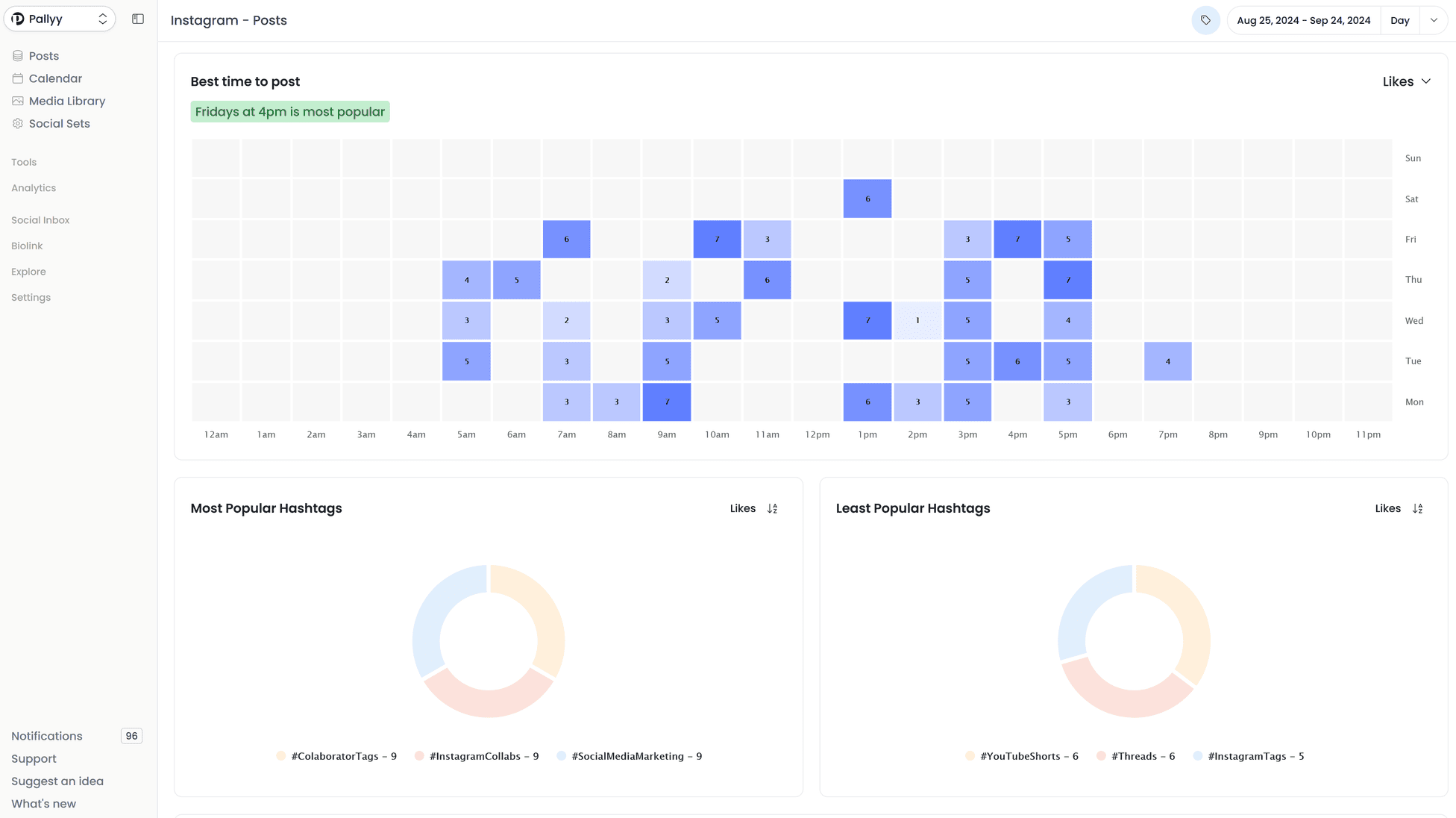
A real analytics view used to track content performance and reporting. ⤴
Clear social media analytics for teams that need better decisions, not more dashboards.
Track follower growth, engagement, post performance, demographics, and custom reports from one place. If you want analytics connected to the rest of your workflow, pair this page with our social media scheduler , publishing , and inbox tools.
Need platform-specific breakdowns? Go deeper with our Instagram analytics , Facebook analytics , or LinkedIn analytics views.
Historical data
See historical data for a range of metrics.
Post tracking
See insights into your posts like eng. rate, likes, comments etc.
Custom reports
Create reports with custom widgets to export as a PDF.
Competitor tracking
Track up to 10 Instagram competitors.
Demographics
See insights into gender, location and age of your followers.
What is social media analytics?
Social media analytics is the process of measuring how your content, audience, and accounts perform so you can see what drives engagement, reach, clicks, and follower growth over time.
Strong social media analytics tools do more than show vanity metrics. They help teams identify patterns, compare performance over time, and make better decisions about future content.
Pallyy keeps that analysis close to your daily workflow, so you can move from planning to publishing to reporting without stitching together separate tools just to understand the results.

"Pallyy is an invaluable tool for social media managers. Its user-friendly design streamlines content management for both clients and team members, making the process more efficient and effortless.
I highly recommend Pallyy to enhance your social media management experience. Pallyy has become an incredible tool that my agency cannot work a day without!"
— The Glow Up Marketing
Social media analytics for agencies, freelancers, and in-house teams.
Whether you report on one brand or dozens of clients, the core need is the same: clean visibility into performance without spending hours exporting data from multiple tools.
Agencies
Track client performance, build cleaner reports, and spot trends across accounts without exporting data from a pile of separate tools.
Freelancers
Show clients what is working, prove the value of your content, and keep reporting simple as you add more brands.
In-house teams
Understand what content performs best, where audience growth is happening, and how campaigns are trending over time.
How Pallyy handles social media analytics.
The workflow stays simple: collect the right data, compare what matters, and turn it into useful reporting.
Track account and post performance
Monitor follower growth, engagement, reach, impressions, and post-level results so you can see how each channel is performing over time.
Spot trends and compare what works
Review historical performance, audience insights, and top content so patterns become easier to see and future planning gets sharper.
Turn the data into reporting
Build custom reports for clients or stakeholders and keep analytics tied to the workflow that created the content in the first place.
Social media analytics features by platform:
Social media analytics FAQ.
Common questions teams ask when comparing social media analytics tools.
What is social media analytics?
Social media analytics is the process of tracking and analyzing performance data from your social accounts and posts so you can measure engagement, growth, reach, clicks, and content effectiveness.
Why is social media analytics important?
It helps teams understand what content performs well, where audience growth is coming from, and which channels or campaigns deserve more attention.
Which platforms does Pallyy support for social media analytics?
Pallyy currently supports social media analytics for Instagram, Facebook, and LinkedIn, with custom reporting on top.
Can I create reports with Pallyy?
Yes. Pallyy includes custom reporting so you can choose the widgets and charts you need, then export reports as a PDF for clients or internal stakeholders.
Who are these social media analytics tools built for?
Pallyy is built for agencies, freelancers, and in-house marketing teams that want practical analytics connected to their publishing workflow.
What should I look for in social media analytics tools?
Look for analytics tools that cover the platforms you use, make reporting easier, show useful historical trends, and connect naturally with your social media scheduler, publishing, and inbox workflow when you need them.
Instagram
-
Followers
See how many followers you've gained and lost.
-
Demographics
See the gender, age, location of your followers
-
Profile clicks
See who clicks your contact, email, text message buttons.
-
Best time to post
See the best time to post depending on like, comment, reach etc.
-
Competitor tracking
Track up to 10 competitors posts, followers, eng. rate and more.
-
Reach & Impressions
See your profile & post reach and impressions.
-
Post tracking
See your full post history, sort by eng. rate, likes, comments and more.
-
Post Hashtags
See how well your posts hashtags perform.
-
Story tracking
Track key insights on your posted stories.
Facebook
-
Followers
See your total followers growth over time.
-
Fans
See your lost and gained fans count.
-
Impressions & views
See how many people have seen your page.
-
Video views
See how many video views you get.
-
Post impressions
How many people see your posts.
-
Post tracking
Track your posts to see eng. users, impressions, engagement etc.
LinkedIn
-
Page views
See pageviews broken down by mobile and desktop.
-
Visitors
See how many people visit your page. Filter by sources.
-
Visitor demographics
See the types of people visiting your page.
-
Share tracking
See insights into your shares (posts).
-
Post insights
Break down your posts by imp., clicks, comments etc.
-
Followers tracking
Track how many followers you are gaining.
-
Followers demographics
Break down your followers by country, region etc.
Reports
-
Custom charts
Add only the charts and widgets you need.
-
Choose timeframe
Choose a custom timeframe.
-
Create unlimited reports
Create as many reports as you can handle.
-
Export as PDF
Export your custom report as a PDF, in standard or high quality.