
Everything billing-related lives in one place: Settings > Subscription in your Pallyy dashboard. Here's how to handle the most common tasks.
Change your plan
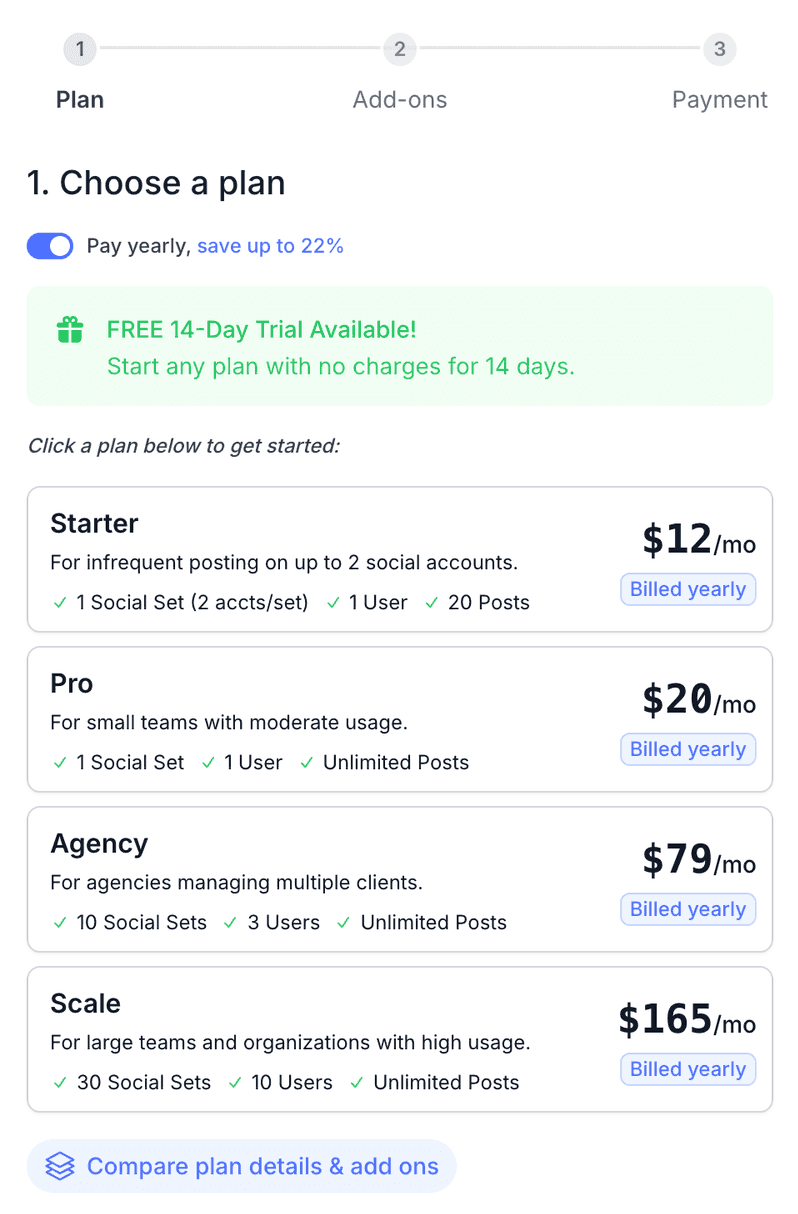
You can upgrade or downgrade your Pallyy plan anytime from Settings > Subscription. Pallyy has three paid plans, Pro, Agency, and Scale, and you can pay monthly or yearly. Yearly billing gives you the best price, so if you're settled in, it's worth the switch. You can compare every plan on our pricing page.
Not on a paid plan yet? Every paid plan starts with a 14 day free trial, and you can read more about how that works in free trials.
Update your payment card
Updating your payment card in Pallyy takes about a minute, whether your card expired or you're switching to a company card.
- Go to Settings > Subscription > Card.
- Enter your new card details in the Card details section.
- Click Update.
That's it. The updated card becomes the default payment method for future payments.
View and download invoices
You can download any Pallyy invoice as a PDF from Settings > Subscription > Invoices, just click the one you need. Handy when your accountant comes asking. If an invoice you're expecting isn't there, contact us at hey@pallyy.com and we'll sort it out.
Cancel your subscription
Cancelling your Pallyy subscription is easy and there's no lock-in, though we'd hate to see you go.
- Go to Settings > Subscription in your Pallyy dashboard.
- Click Cancel.
- Let us know your reason, then confirm.
Your subscription stays active until the end of your current billing period, with full access to your paid features until then.
Wondering about money back? See our refunds article.
Add-ons
Pallyy add-ons give you a bit more room without jumping to a bigger plan.
- Extra social sets cost $10/mo or $120/yr each on Pro and Agency. Pro can add up to 29 extra sets, and Agency up to 20.
- Extra users are available on Pallyy Agency at $10/mo or $120/yr each, up to 7 extra users.
- On the Scale plan, add-ons use custom pricing, so just get in touch.
Frequently asked questions
Will I lose access as soon as I cancel?
No. Your Pallyy plan stays active until the end of the billing period you've already paid for, and you keep full access to paid features until then.
Can I switch between monthly and yearly billing?
Yes, you can switch your Pallyy plan between monthly and yearly billing from Settings > Subscription, where plan changes are managed. Yearly billing works out cheaper than paying month to month.
My payment failed. What should I do?
A failed Pallyy payment is usually down to an expired or replaced card. Update your card at Settings > Subscription > Card and the new card will be used for future payments. Still stuck? Email hey@pallyy.com.
More in Pricing
Still need help? Email us at hey@pallyy.com and we'll get back to you.