
Pallyy's custom domains let you serve your shared calendar from a branded address, either a custom Pallyy subdomain or a domain you own, all from Settings > Custom domain. When a client opens their calendar link, the URL says you, not us.
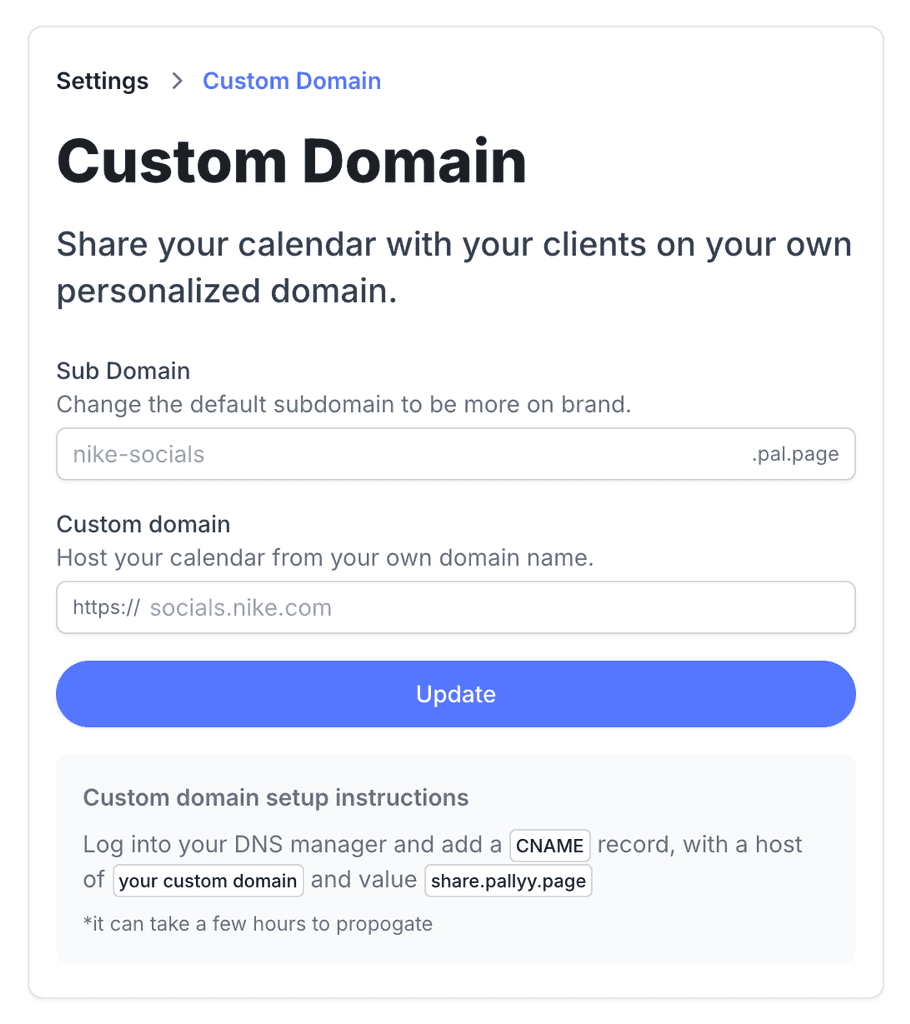
How to set up a custom domain
Both options live on one settings page.
- Go to Settings > Custom domain.
- For a quick rebrand, enter a new Sub Domain.
- To go fully white label, enter a domain you own in Custom domain, like socials.nike.com.
- Click Update.
- If you added your own domain, follow the DNS setup instructions on the page. Once it's live, your shared calendar links use the new address.
Change your Pallyy subdomain
The quickest branding win is changing your shared calendar's Pallyy subdomain to something on brand, like nike-socials. Head to Settings > Custom domain, set the subdomain, and every shared calendar link you send from then on carries your name.
Changing the subdomain needs no DNS and no setup, just a better looking link.
Use a domain you own
For full white labeling, you can host the shared calendar from a domain you own, like socials.nike.com. Set it up from the same Settings > Custom domain page. This is the option agencies tend to reach for: the client reviews their content on a link that looks and feels like it belongs to you, because it does.
Which plans include custom domains
Custom domains for shared calendar and client links are included on every plan that includes the shared calendar, which is Pro, Agency, and Scale. If you're on the Free plan and want branded client links, upgrading to Pro unlocks both the shared calendar and the custom domain together.
Frequently asked questions
Where do I set up a custom domain?
At Settings > Custom domain in Pallyy. You can change your Pallyy subdomain or connect a domain you own from the same page.
Do I have to own a domain to use this?
No. You can simply change your shared calendar's Pallyy subdomain to something on brand, like nike-socials, with zero DNS work. Owning a domain is only needed for the full socials.yourbrand.com style setup.
What does a custom domain actually affect?
Your shared calendar and client links. Pallyy serves the shared calendar your clients open from your branded address instead of the default one.
More in Features
Still need help? Email us at hey@pallyy.com and we'll get back to you.