
Pallyy's Instagram grid planner shows your published Instagram posts and scheduled ones together in one grid, so you can see exactly how your profile will look before anything goes live. You'll find it under Publish > Plan > Instagram Grid, and it needs a connected Instagram account, which our Instagram integration guide covers.
The grid is also where a client's whole feed gets planned before anything is scheduled, which is why agencies use it alongside approvals.
How to plan your grid
Planning a feed in the grid is mostly dragging things until they look right.
- Go to your grid at Publish > Plan > Instagram Grid.
- Drag media from the side panel onto the grid to start a post, or click New in the header.
- Finish the post in the composer and schedule it.
- Drag your scheduled posts around until the feed flows. Each drag reschedules them to match the new order.
- Select any post whose position is final and click Lock so later rearranging can't move it.
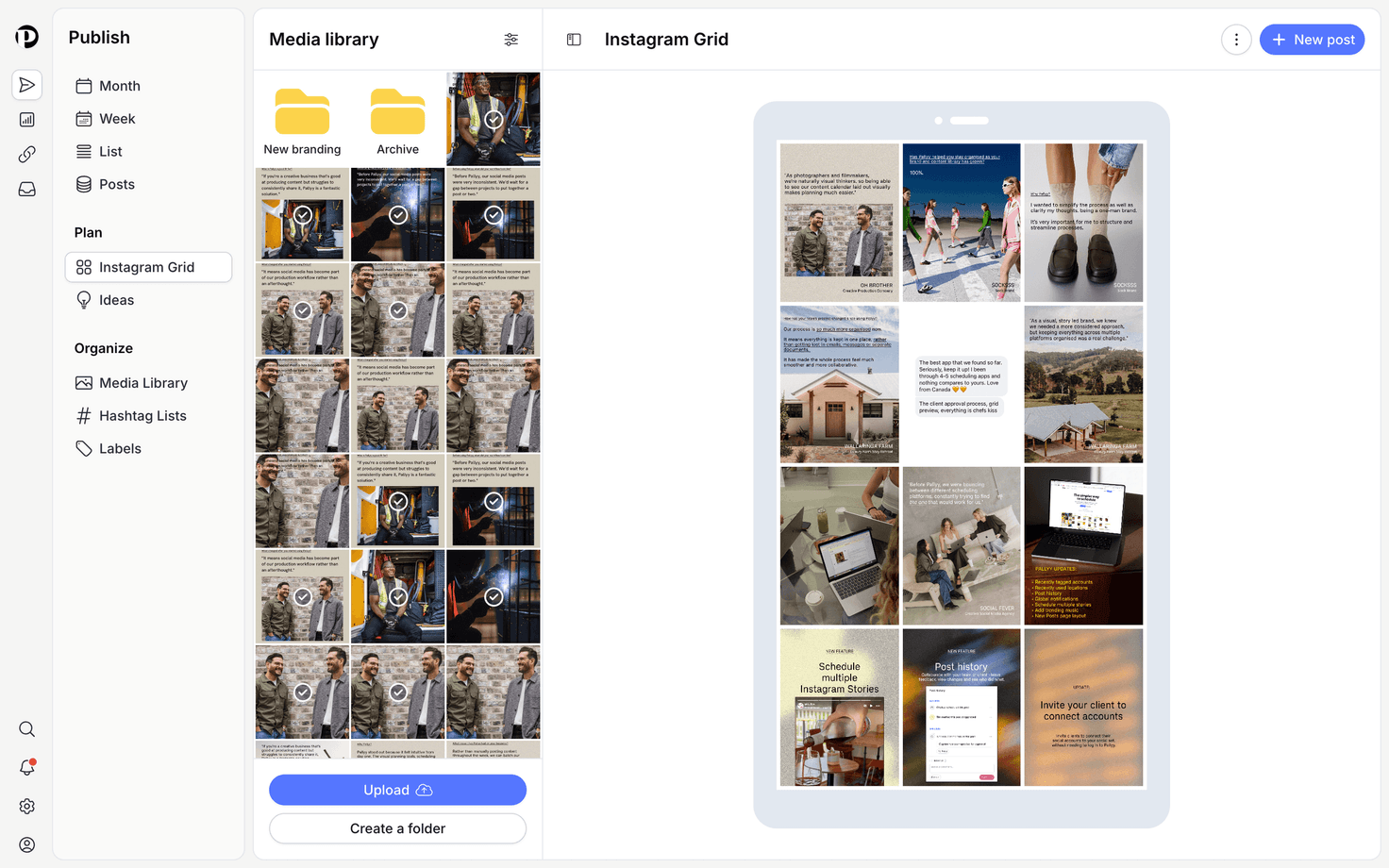
Plan by dragging
Rearranging your Pallyy grid is all drag and drop: drag media in from the side panel to start a new post, and drag scheduled posts around to reorder them, which reschedules them to match. Your published posts stay put as the fixed part of the picture, and your scheduled posts slot in around them until the whole feed flows.
Tune the preview
Pallyy's grid options let you shape the preview to match how your profile actually looks. From the grid's options you can show or hide the preview, display posts as portrait or square, show or hide reels, and show or hide manual posts. The header also gives you Post History, Settings, and Best time to post, the same tools you'll know from the calendar.
Use bulk actions
Pallyy's grid supports bulk selection, so you can act on several posts at once instead of one by one. Select the posts you want, then:
- Lock or Unlock them
- Save as draft
- Schedule
- Delete
Locking is the grid's superpower for a carefully arranged feed: locked posts can't be moved, so a late night drag session can't wreck the layout you spent an afternoon perfecting.
Locked posts won't budge when you drag posts around the grid. If a post refuses to move, check whether it's locked and unlock it first.
Frequently asked questions
Does rearranging the grid change my scheduled times?
Yes. Dragging a scheduled post to a new position in Pallyy's grid reschedules it to fit the new order. That's the point: the grid keeps your visual layout and your schedule in sync.
Can I rearrange posts that are already published?
No. Pallyy's grid shows your published Instagram posts so you can plan around them, but only scheduled posts can be dragged into new positions. Instagram doesn't allow reordering a live feed.
What does locking a post do?
Locking a post in Pallyy's grid stops it from being moved, so its position survives any amount of rearranging. Unlock it whenever you want to move it again, on its own or as part of a bulk selection.
More in Features
Still need help? Email us at hey@pallyy.com and we'll get back to you.