
Pallyy tags other Facebook pages right in your caption: type @ in the Facebook caption, pick the page from the mention dropdown, and the tag publishes with the post. It's the same mention behavior you'd get writing the post on Facebook itself, working from your scheduling calendar instead.
How to tag a page
Page tags go in the caption itself, through the mention dropdown:
- Create or open a post from Calendar > Month.
- In the composer, click into the Caption field on the Facebook card.
- Type @ and start typing the page's name.
- Pick the page from the dropdown that appears, and the mention drops into your caption as a real tag, not just plain text.
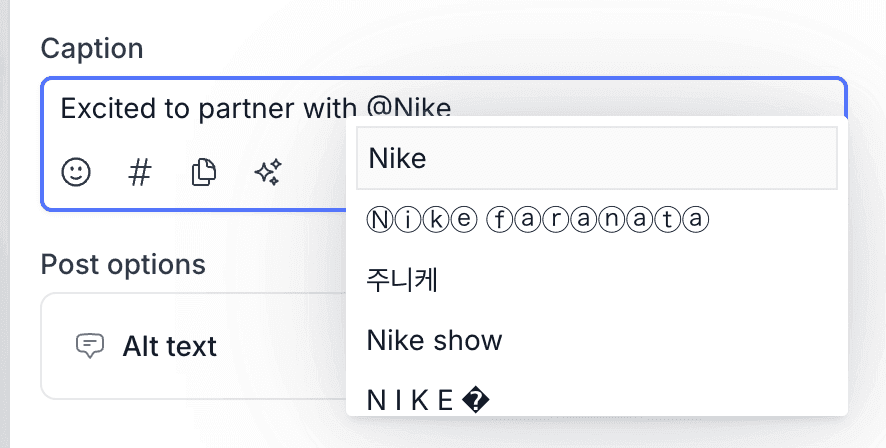 5. Schedule as normal. The tag publishes with the post.
Because the tag is part of the caption, you can place it wherever it reads best: mid-sentence for a partner shout-out, or at the end as a credit.
Why tag other pages
Tagging puts your post in front of the tagged page's audience, which is the point of most collaborations. Partner announcements, event co-hosts, supplier features, customer spotlights on business pages: a tag makes the connection official and clickable, and the tagged page gets notified.
You'll need your Facebook page connected first, so if you haven't set that up, start with the Facebook integration.
More Facebook post options
Page tags aren't the only Facebook extra Pallyy supports, since image posts can also carry a location. Tag the page and set the location on the same post, and your published post looks exactly like one composed natively.
Frequently asked questions
How do I tag a Facebook page in Pallyy?
Type @ in the Facebook caption and pick the page from the mention dropdown. Pallyy publishes the tag with the post.
Does the tag publish automatically?
Yes. A page you tag through Pallyy's mention dropdown publishes as a real tag in the live post, with nothing to finish on Facebook afterwards.
Can I add a location to a Facebook post too?
Yes. Pallyy's Facebook posts support locations on image posts, alongside page tags in the caption.
More in Features
Still need help? Email us at hey@pallyy.com and we'll get back to you.