
Pallyy's composer lets you write a post once and send it to every connected network at the same time. Toggle networks on or off in the composer header, and each enabled network gets its own version of the post that you can tailor individually.
How to create and schedule a post
Post creation starts from Calendar > Month. Here's the full flow:
- Open the calendar and click New, then Post. Dragging media onto a day works too.
- In the quick draft that opens, toggle networks on or off, write a caption, and add media, then click Continue to edit to open the full composer.
- Tweak the caption and media for each network, or use Copy to all to keep them identical.
- Pick a time: click the date in the footer, choose a Date and Time, and click Apply. Or pick a slot from Queue times.
- Click Schedule. The post lands on your calendar, ready to publish at the time you chose.
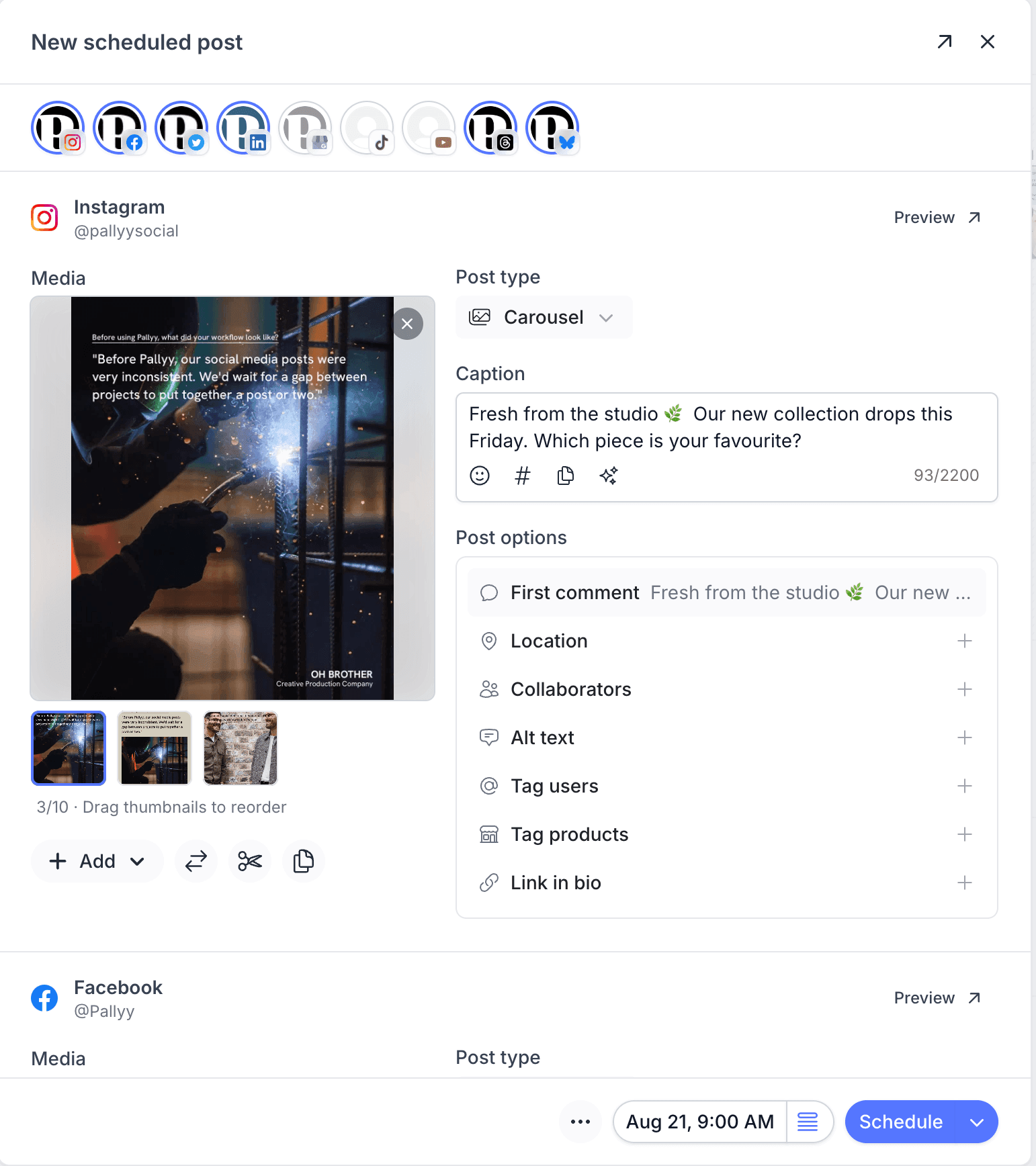
Write your caption
Pallyy's caption editor comes with a toolbar built for social: an emoji picker, an Insert hashtags button that pulls from your hashtag lists, and a Generate with AI option when you're staring at a blank box. Written the perfect caption on one network? Copy to all copies it across every enabled network in one click. And if you'd rather not start from scratch at all, the Instagram caption library has thousands of ready-made lines to paste in.
A character counter keeps you inside each platform's limit, from Bluesky's 300 characters up to Facebook's 63,000, with Instagram at 2,200 in between.
Add and edit your media
Pallyy's media gallery accepts uploads, files from your media library, and media from your other social sets. Once media is in the post you can:
- Crop to the right aspect for the post type: 1:1, 4:5, or 9:16
- Reorder images in a carousel and preview any file
- Copy media to all networks so every platform matches
- Add alt text (up to 256 characters) for accessibility
Preview every network before it goes live
Pallyy shows live per-network previews in a side panel or modal, so you can see exactly how the post will look on each platform while you're still editing. No surprises after publishing.
Schedule, publish now, or save a draft
Pallyy gives you three ways to get a post out of the composer, all in the footer:
- Pick date & time to schedule for a specific moment. The Queue times dropdown suggests your next available slots, with More queue times and Edit queue times a click away. Read more in queue scheduling.
- Publish now, from the dropdown next to the Schedule button, saves the post and publishes it immediately after you confirm.
- Save as draft keeps the post safe without scheduling it.
A draft never publishes on its own. Drafts show a banner in the composer reminding you they won't go out until you schedule them.
Need more? More Options holds labels, clone posts, post history, and delete.
Start a quick draft from the calendar
Pallyy opens a quick draft whenever you drop media straight onto the calendar. Add a caption, toggle networks, and you're done, or hit Continue to edit (Ctrl+Shift+C) to open the full composer.
Frequently asked questions
Can I customize a post for each network?
Yes. Pallyy creates a version of the post for every network you enable, so you can tweak captions and media per platform, or use Copy to all to keep them identical.
Does publishing now really publish immediately?
Yes. When you choose Publish now in Pallyy's composer and confirm, the post is saved and published immediately, no scheduled time involved.
Will a draft ever publish on its own?
No. A Pallyy draft stays a draft until you schedule it, and the draft banner in the composer reminds you of exactly that.
More in Features
Still need help? Email us at hey@pallyy.com and we'll get back to you.