
Pallyy's clone feature duplicates any post so you never rebuild content from scratch: Clone copies a post within the same social set, and Clone to sets pushes it into other social sets. Cloning is included on every paid plan, see pricing for the full comparison.
How to clone a post
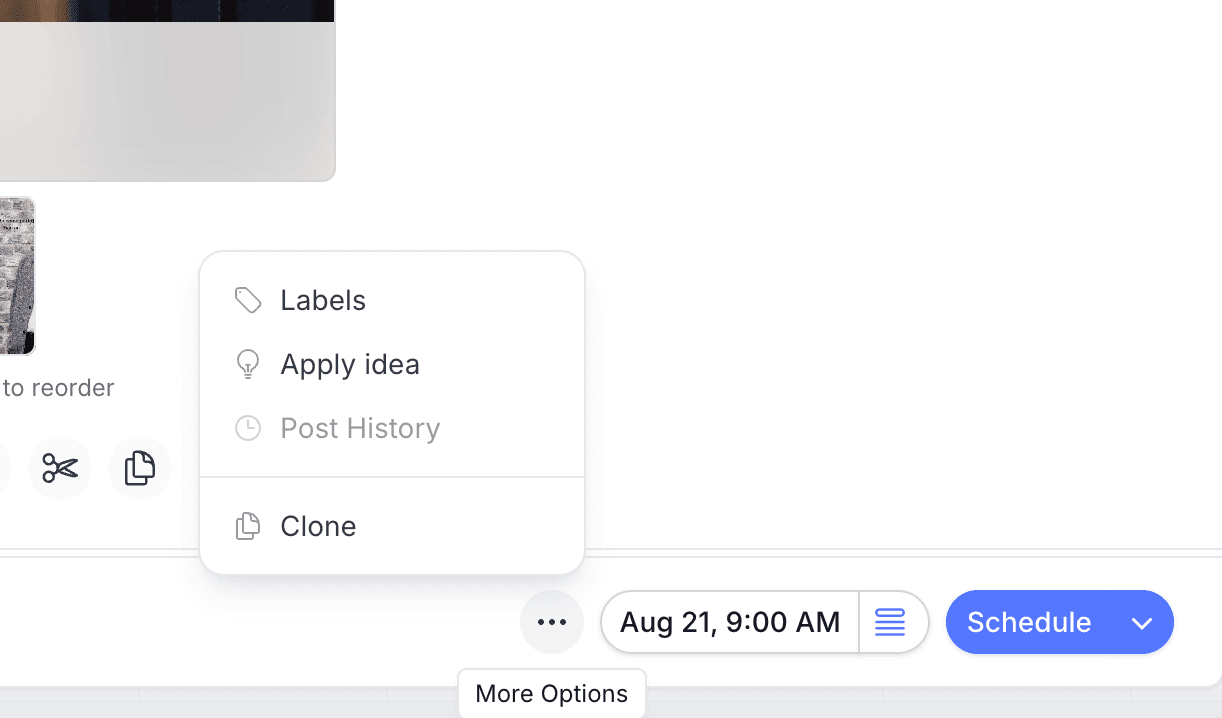
Cloning lives under the composer's More Options menu. To duplicate a post:
- Open the post you want to copy from Calendar > Month or the posts list.
- Click More Options (the three dots button) in the footer.
- Choose Clone to duplicate it in the same social set, or Clone to sets to copy it into other sets you manage.
- Adjust the copy's caption, media, or networks as needed.
- Pick a date and time, then click Schedule.
Where you can clone from
Pallyy's Clone option duplicates a post inside the social set it lives in, perfect for reposting evergreen content or using an old post as a starting point. You'll find it in a few places:
- In the composer, under More Options while you create or edit a post in the post composer.
- On the posts list, including as a bulk action for cloning several posts at once.
- On published posts, and on failed posts as Clone failed, so a publishing hiccup never means rewriting the post.
Clone to other social sets
Pallyy's Clone to sets copies a post into other social sets, and each copy becomes its own independent post. This is how agencies push one piece of content to several clients: think a multi-location business, where head office writes the post once and clones it to every location's set. Each location's manager can then tweak their copy, swap the media, or adjust the caption without touching anyone else's version.
Cloned copies don't stay in sync. Once a post is cloned to another set, editing the original won't update the copies, and vice versa. That's by design, so each set can localize freely.
Reuse published and failed posts
Pallyy lets you clone posts that have already published, and failed posts too. Cloning a published post is the fastest way to rerun a top performer, and Clone failed rebuilds a failed post in one click so you can fix the issue and reschedule.
Frequently asked questions
What's the difference between Clone and Clone to sets?
Pallyy's Clone duplicates a post in the same social set, while Clone to sets copies it into other social sets you manage. Use Clone for reposting, and Clone to sets for pushing content across clients or locations.
If I edit a cloned post, does the original change?
No. Every Pallyy clone is an independent post, so editing one copy never affects the original or any other copy.
Which plans include clone posts?
Pallyy's clone posts feature is included on every paid plan: Pro, Agency, and Scale.
More in Features
Still need help? Email us at hey@pallyy.com and we'll get back to you.