
Pallyy lets you pick the cover image for your scheduled videos, so the thumbnail people see is one you chose, not whatever frame the platform grabbed. Instagram Reels, Facebook videos, and YouTube Shorts each get their own way to set it.
How to set a video cover image
The cover picker lives in the network's Post options section in the composer. To set a cover:
- Open a post with a video from Calendar > Month.
- In the network's Post options section, click the Cover image row.
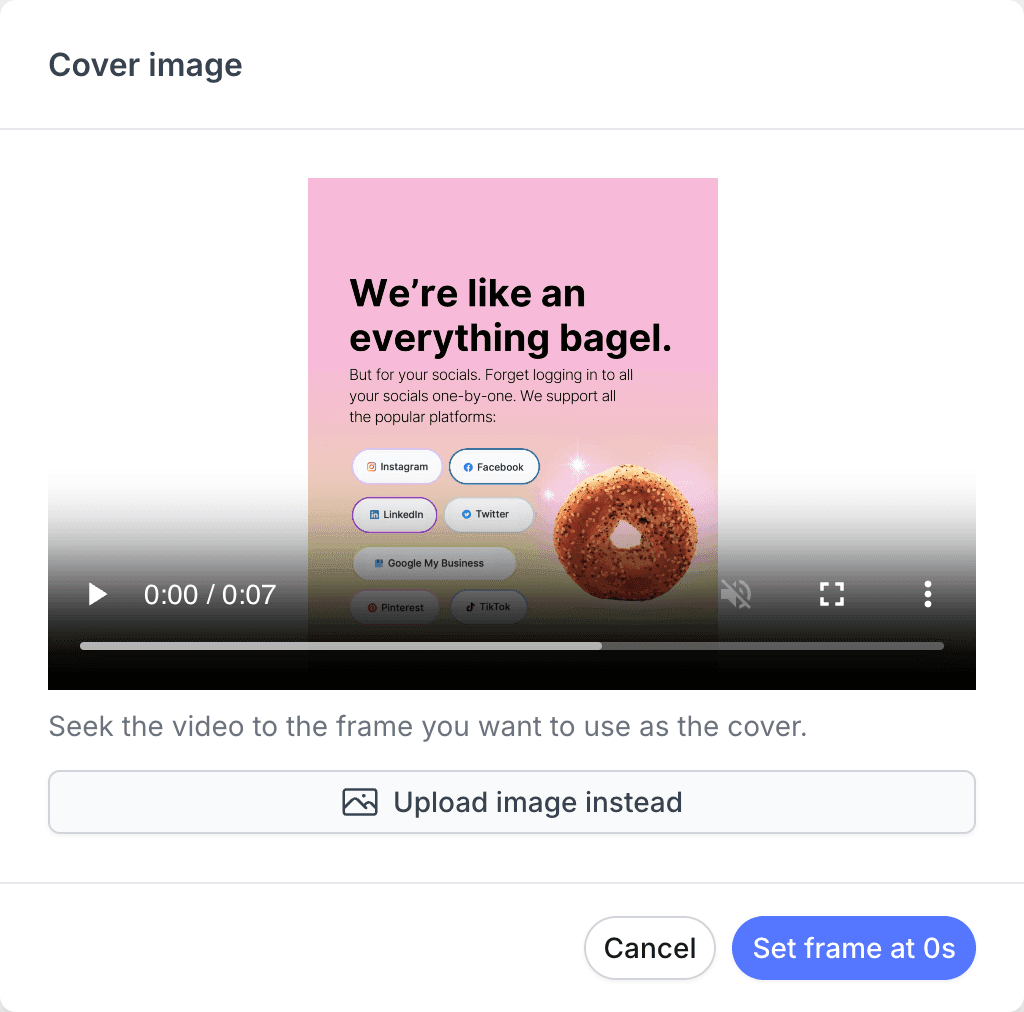
- Seek the video to the frame you want as the cover.
- On Instagram Reels, you can click Upload image instead to use your own designed cover.
- Confirm your choice. The button shows the frame time you picked, or Save for an uploaded image.
Instagram Reels
Pallyy gives you two ways to set a Reel's cover: choose a frame from the video itself, or upload a separate image. Scrubbing to a strong frame is the fast option, while uploading an image lets you use a designed cover, the kind with text or consistent branding, that isn't in the video at all. Either way, you set it while you create a post, before the Reel publishes through your Instagram integration.
Facebook videos
Pallyy sets a Facebook video's cover by the second of the video you choose. Pick the moment where the shot looks best, and that frame becomes the cover when the video publishes.
There's no separate image upload for Facebook video covers, so it pays to find a second where the video genuinely shines.
YouTube Shorts
Pallyy supports a cover image on YouTube Shorts too, so your Short shows up with the cover you picked rather than a random frame.
Frequently asked questions
Can I upload a custom cover image for a Reel?
Yes. Instagram Reels in Pallyy accept either a frame chosen from the video or an uploaded image, so a designed cover that never appears in the video works fine.
How do Facebook video covers work?
Facebook videos use a frame from the video itself. In Pallyy you pick the second of the video to use, and that frame becomes the cover.
Do YouTube Shorts get a cover?
Yes. Pallyy supports a cover image on YouTube Shorts, so you're not stuck with whatever frame YouTube picks on its own.
More in Features
Still need help? Email us at hey@pallyy.com and we'll get back to you.