
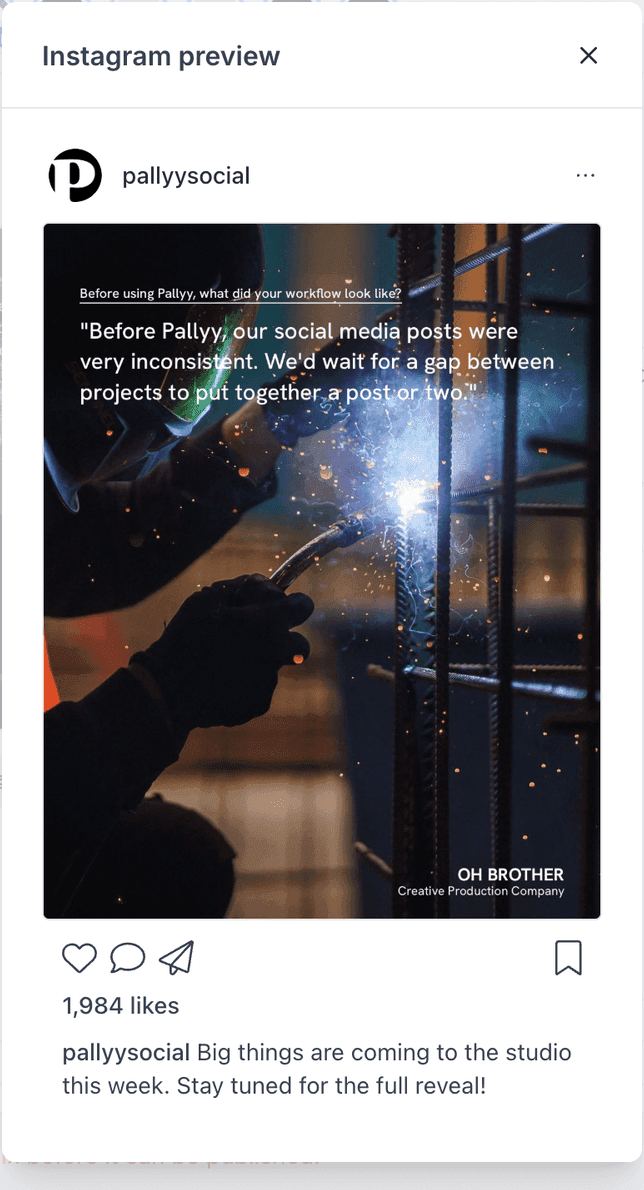
Pallyy's composer shows live per-network previews of your post, so you see exactly how it'll look on each platform before it publishes. On large screens the previews sit in a side panel beside your post; on smaller screens they open in a modal.
How to preview a post
Previews open from each network's header in the composer. To check a post before it publishes:
- Open your post from Calendar > Month, or start one with New, then Post.
- Click Preview next to the account name on the network you want to check.
- The preview opens in a side panel on large screens, or in a modal on smaller ones.
- Keep editing. The preview updates live as you change the caption or media.
- When it looks right, close the preview and click Schedule.
What the previews cover
Pallyy previews every network you can post to:
- Instagram: feed, Reel, and story
- X (Twitter)
- TikTok
- Threads
- YouTube
- Google My Business
- Bluesky
There's also a preview for push notification posts, so even posts you finish on your phone get checked first. Each Instagram preview matches the same Instagram integration formats Pallyy publishes to.
Instagram getting three separate previews matters more than it sounds: a caption that works under a feed photo can land very differently on a Reel or a story.
Previews update as you edit
Pallyy's previews are live, updating as you type and as you change media while you create a post. That's how you catch the problems that only show up in context: an image cropped at the wrong spot, a line break that lands awkwardly mid-sentence, a caption that runs longer than it felt in the editor. Fix it in the composer, watch the preview change, and publish with no surprises.
Link previews
Links in supported posts generate a link preview, the thumbnail and title card readers see on the feed, and Pallyy shows it in your post preview before anything publishes. If the card pulls the wrong image or a clunky title, you'll know while the post is still editable rather than after it's live.
Frequently asked questions
Where do the previews appear?
In a side panel on large screens, or in a modal. Either way you're looking at the same live per-network previews while you edit.
Do previews show each network separately?
Yes. Every network gets its own preview, and Instagram gets three: feed, Reel, and story. Since each enabled network has its own version of the post, each preview reflects that network's caption and media.
Do I need to refresh to see my changes?
No. Previews update as you edit, so the moment you tweak a caption or swap an image, the preview reflects it.
More in Features
Still need help? Email us at hey@pallyy.com and we'll get back to you.