
Pallyy tags LinkedIn pages in your scheduled posts, so the mention publishes with the post and links straight to the tagged company's page. No publishing the post first and editing the tag in later: it's part of the post from the start.
How to tag a LinkedIn page
Tags go straight into the caption on the LinkedIn card:
- Create or open a post from Calendar > Month.
- In the composer, click into the Caption field on the LinkedIn card.
- Type @ and start typing the company's name.
- Pick the page from the suggestions that appear, and the mention becomes part of the post.
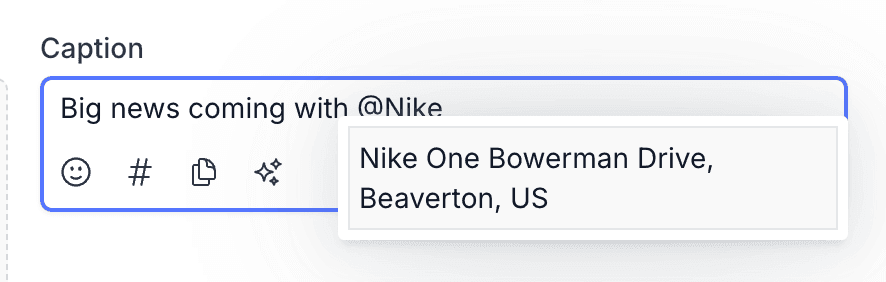 5. Schedule as normal. The mention publishes live and clickable, notifying the tagged page just as a native mention would.
You'll need your LinkedIn account connected first, which the LinkedIn integration guide walks through.
Why tag pages on LinkedIn
Page tags turn a name-drop into a connection, which is why they're everywhere in B2B content. Partnership announcements, client wins, event recaps with co-hosts, hiring posts that mention a parent company: tagging the page makes the relationship visible and gives readers a direct path to the company you're talking about.
The tagged page sees the mention too, which often earns a reshare to their audience.
What else LinkedIn posts support
Page tags sit alongside the rest of Pallyy's LinkedIn support: alt text and previews. Add alt text to your images for accessibility, and check the post preview to see how everything will look before it publishes. Together they mean the post that goes out is the post you saw.
Frequently asked questions
Can I tag a company page on LinkedIn through Pallyy?
Yes. Pallyy's LinkedIn posts support tagging pages, and the tag publishes with the post as a real, clickable mention.
Does the tagged page get notified?
Yes. A page tag published through Pallyy behaves like a native LinkedIn mention, so the tagged page sees it and readers can click through.
What else can I add to a LinkedIn post in Pallyy?
Alt text and previews. Pallyy's LinkedIn posts support alt text on images and previews, so you can make posts accessible and check them before they publish.
More in Features
Still need help? Email us at hey@pallyy.com and we'll get back to you.